75-inch TV Dimensions. Dimensions in CM, Inches & Room Size
When you want to buy a 75-inch TV, it’s essential to understand all 75-inch Tv dimensions. These are big screens, so we explain how much height, width, and depth the TV has. All dimensions depend on the screen size of your TV. Based on our overall Tv-Screen sizes page we got many questions like “what size is a 75 inch TV?”. Let’s go for it.
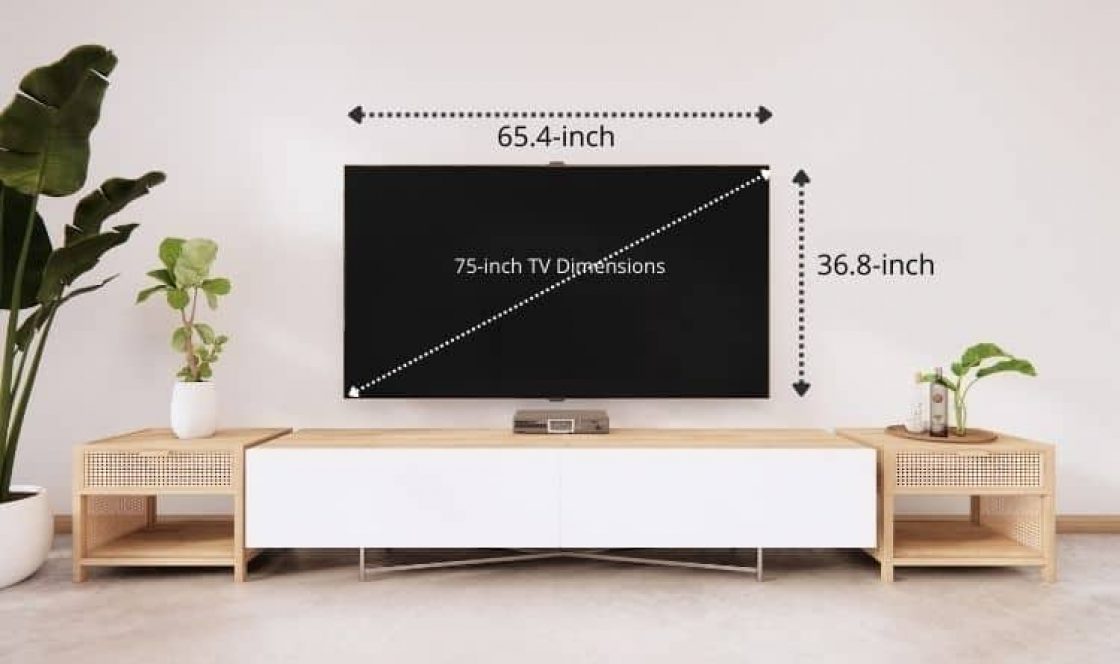
Not all 75-inch TVs are the same size. The screen can vary based on the brand, frame design, mounting options and thickness. Average 75″ TV dimensions are 65″ wide, 38″ high and 2″ thick.
TV-spec guide

Jump immediately to the Frequently asked questions section of this page
Table of Content of 75-Inch TV Screen
- Quick Summary about the size of a 75-Inch TV-screen
- 75-inch TV size chart
- Brand-Specific 75″ TV Dimensions
- 75″ TV vs Other TV screen sizes
- Wall Mount Installation Guide
- TV Stand Requirements
- How to set up a big 75″ TV in a living room
- FAQ about 75 inch TVs
What Size is a 75 inch TV Quick read
- Not all 75-inch TVs have the same dimensions. Check the specs of the brand of the model you want to buy
- A 75″ TV average dimension in inches is 65 inches wide, 38 inches tall, and 2 inches thick.
- A 75″ TV average dimension in centimeters is 167.3 cm wide, 95.8 cm tall and 6 cm high
- The area required on your wall for the 75-inch television is 2407-inch2 or 16.000 cm² or 1.6m²
- Typically a 75-inch TV weighs between 75 pounds – 34 kgs and 135 pounds or 61 kg, depending on the brand and price level of the screen.
- The viewing distance to a 75-Inch TV must be at least 9.4 feet or 2.9 meters. A minimum room size must be 12 by 12 feet.
Size Chart of 75″ TV Screen Dimensions
Many Big screen TVs are either wall-mounted or placed on a tv stand. You will also need to consider a tv stand’s size. The 3 dimensions you need to know when measuring tv size: The width, height, and depth or thickness.
How to measure TV dimensions?
Use a tape ruler to take dimensions. A tip is to cut the dimensions out of cardboard to simulate the impact of a 75-inch TV.
- TV width: is measured from side to side.
- TV height: is measured from top to bottom
- TV depth: is the thickness of the tv from front to back.
- Diagonal: The distance of the upper right corner to the lower left corner of the TV
Brand-Specific 75-inch TV Dimensions
Different manufacturers have slightly different dimensions for their 75-inch TVs due to bezel design, panel technology, and stand configurations. Here’s a comparison of popular 75″ TV models:
Samsung 75-Inch TV Dimensions
| Model | Width | Height (No Stand) | Height (With Stand) | Depth | Weight |
| Samsung QN90C 75″ | 65.8″ (167.1 cm) | 37.6″ (95.5 cm) | 40.5″ (102.9 cm) | 1.1″ (2.8 cm) | 89.7 lbs (40.7 kg) |
| Samsung Q80C 75″ | 66.1″ (167.9 cm) | 37.8″ (96 cm) | 41.2″ (104.6 cm) | 2.3″ (5.8 cm) | 85.8 lbs (38.9 kg) |
| Samsung TU8000 75″ | 66.2″ (168.1 cm) | 38.0″ (96.5 cm) | 41.8″ (106.2 cm) | 2.4″ (6.1 cm) | 81.6 lbs (37 kg) |
| Samsung Frame 75″ | 66.3″ (168.4 cm) | 38.1″ (96.8 cm) | 41.5″ (105.4 cm) | 1.0″ (2.5 cm) | 77.8 lbs (35.3 kg) |
Samsung VESA Pattern: 400mm x 400mm
LG 75-Inch TV Dimensions
| Model | Width | Height (No Stand) | Height (With Stand) | Depth | Weight |
| LG C3 OLED 75″ | 65.9″ (167.4 cm) | 37.8″ (96 cm) | 40.8″ (103.6 cm) | 1.8″ (4.6 cm) | 76.3 lbs (34.6 kg) |
| LG Gallery Series 75″ | 65.9″ (167.4 cm) | 37.8″ (96 cm) | 40.5″ (102.9 cm) | 0.9″ (2.3 cm) | 73.4 lbs (33.3 kg) |
| LG QNED85 75″ | 66.1″ (167.9 cm) | 38.0″ (96.5 cm) | 41.3″ (104.9 cm) | 2.6″ (6.6 cm) | 78.0 lbs (35.4 kg) |
LG VESA Pattern: 600mm x 400mm
Sony 75-Inch TV Dimensions
| Model | Width | Height (No Stand) | Height (With Stand) | Depth | Weight |
| Sony X90L 75″ | 65.9″ (167.4 cm) | 37.6″ (95.5 cm) | 40.4″ (102.6 cm) | 2.8″ (7.1 cm) | 82.7 lbs (37.5 kg) |
| Sony Bravia XR A80L 75″ | 65.7″ (166.9 cm) | 37.9″ (96.3 cm) | 40.8″ (103.6 cm) | 2.1″ (5.3 cm) | 79.4 lbs (36 kg) |
| Sony X950G 75″ | 66.0″ (167.6 cm) | 37.9″ (96.2 cm) | 40.9″ (103.8 cm) | 2.9″ (7.3 cm) | 88.2 lbs (40 kg) |
Sony VESA Pattern: 400mm x 300mm
TCL 75-Inch TV Dimensions
| Model | Width | Height (No Stand) | Height (With Stand) | Depth | Weight |
| TCL 6-Series 75″ | 65.8″ (167.1 cm) | 37.7″ (95.8 cm) | 41.0″ (104.1 cm) | 3.1″ (7.9 cm) | 75.4 lbs (34.2 kg) |
TCL VESA Pattern: 400mm x 300mm
Key Takeaway: While all are marketed as “75-inch” TVs, actual dimensions vary by up to 2 inches in width and height. OLED models (Samsung Frame, LG C3) are typically thinner, while LED models are slightly thicker.
75 Tv Dimensions comparison Chart vs Other Sizes
A complete Screen Dimensions comparison table from 32″ up to 85″ TV screens, by width, Height and area. (in inches and centimeters)
Related: TV Screen Size Chart
| Size | Width | Height | Area |
|---|---|---|---|
| 32″ | 27.9″ 70.9 cm | 15.7″ 39.9 cm | 438 in² 0.283 m² |
| 40″ | 34.9″ 88.6 cm | 19.6″ 49.8 cm | 684 in² 0.441 m² |
| 43″ | 37.5″ 95.3 cm | 21.1″ 53.6 cm | 791 in² 0.511 m² |
| 50″ | 43.6″ 110.7 cm | 24.5″ 62.2 cm | 1068 in² 0.689 m² |
| 55″ | 47.9″ 121.7 cm | 27″ 68.6 cm | 1293 in² 0.835 m² |
| 60″ | 52.3″ 132.8 cm | 29.4″ 74.7 cm | 1538 in² 0.992 m² |
| 65″ | 56.7″ 144 cm | 31.9″ 81 cm | 1809 in² 1.166 m² |
| 70″ | 61″ 154.9 cm | 34.3″ 87.1 cm | 2092 in² 1.349 m² |
| 75″ | 65.4″ 166.1 cm | 36.8″ 93.5 cm | 2407 in² 1.553 m² |
| 80″ | 69.7″ 177 cm | 39.2″ 99.6 cm | 2732 in² 1.763 m² |
| 85″ | 74.1″ 188.2 cm | 41.7″ 105.9 cm | 3090 in² 1.993 m² |
related: What size is a 55 inch TV? Dimensions in cm, inches & room size
75″ vs 65″ vs 85″: Size Comparison
| Feature | 65″ TV | 75″ TV | 85″ TV |
| Width | 56.7″ | 65.4″ | 74.1″ |
| Height | 31.9″ | 36.8″ | 41.7″ |
| Screen Area | 1,809 in² | 2,407 in² | 3,090 in² |
| % Larger than 65″ | – | +33% larger | +71% larger |
| Viewing Distance | 8.1-12.5 ft | 9.4-15.6 ft | 10.6-17.7 ft |
| Min Room Size | 10′ x 12′ | 12′ x 14′ | 14′ x 16′ |
Important: Moving from 65″ to 75″ provides 33% more screen area, making it a significant upgrade for larger rooms.
Viewing Distance size chart for a 75 inch TV
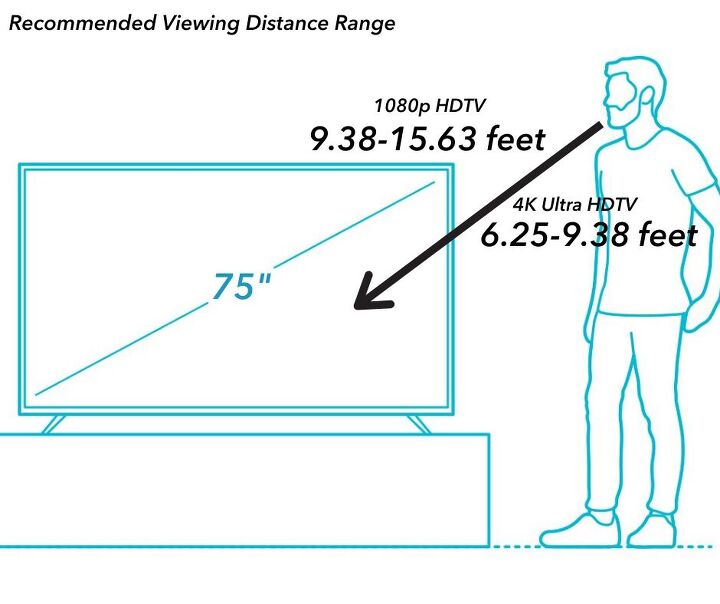
The Ideal viewing distance of for a 75″ TV depends on your room, the viewing angle, and the number of people you’re with.For 4K resolution TVs, you can sit closer than older HD models.
Recommended Viewing Distances for 75″ TV
| Resolution | Minimum Distance | Optimal Distance | Maximum Distance |
|---|---|---|---|
| 4K/Ultra HD | 6.3 feet (1.9 m) | 9.4 feet (2.9 m) | 15.6 feet (4.7 m) |
| 1080p HD | 9.4 feet (2.9 m) | 12.5 feet (3.8 m) | 18.8 feet (5.7 m) |
| 720p HD | 12.5 feet (3.8 m) | 18.8 feet (5.7 m) | 25 feet (7.6 m) |
Formula: For 4K TVs, multiply the screen height (37 inches) by 1.5 to get optimal viewing distance: 37″ × 1.5 = 55.5 inches = 4.6 feet (minimum). Most experts recommend 9-10 feet for the best experience.
Viewing Distance Comparison Chart
| TV Screen Size | 4K Viewing Distance | 1080p Viewing Distance |
|---|---|---|
| 55″ | 4.6 – 6.9 feet | 6.9 – 11.5 feet |
| 60″ | 5 – 7.5 feet | 7.5 – 12.5 feet |
| 65″ | 5.4 – 8.1 feet | 8.1 – 13.5 feet |
| 70″ | 5.8 – 8.75 feet | 8.75 – 14.6 feet |
| 75″ | 6.3 – 9.4 feet | 9.4 – 15.6 feet |
| 80″ | 6.7 – 10 feet | 10 – 16.7 feet |
| 85″ | 7.1 – 10.6 feet | 10.6 – 17.7 feet |
Viewing Angle Considerations
For the best picture quality from a 75-inch TV:
- Optimal viewing angle: Sit directly in front of the TV (0-15° off-center)
- Acceptable viewing angle: Up to 30° off-center
- Maximum viewing angle: 40° off-center (image quality degrades)
For multiple viewers: Arrange seating in an arc so everyone sits within 30° of center for the best experience.
Related: What size is a 42 inch TV? Dimensions in cm, inches & room size
Wall Mount Installation Guide for 75-inch TV
Wall mounting a 75-inch TV requires careful planning, the right equipment, and ideally two people for safe installation.
VESA Mounting Patterns for 75″ TVs
VESA (Video Electronics Standards Association) patterns specify the distance between mounting holes on your TV. Most 75-inch TVs use one of these patterns:
| VESA Pattern | Hole Spacing | Common Brands |
|---|---|---|
| 400mm x 400mm | 15.7″ x 15.7″ | Samsung (most models), Sony |
| 600mm x 400mm | 23.6″ x 15.7″ | LG, some Sony models |
| 300mm x 300mm | 11.8″ x 11.8″ | Rare for 75″ TVs |
How to find your VESA pattern: Measure the distance (in mm) between the mounting holes on the back of your TV, both horizontally and vertically.
Types of Wall Mounts for 75″ TVs
1. Fixed/Flat Mounts
- Best for: Clean, low-profile look
- Pros: Most affordable, slimmest profile (1-2″ from wall), most secure
- Cons: No angle adjustment
- Weight capacity needed: 100-120 lbs
- Price range: $40-$100
2. Tilting Mounts
- Best for: TVs mounted above eye level
- Pros: Reduces glare, adjustable viewing angle
- Tilt range: Usually 5-15° downward
- Profile: 2-4″ from wall
- Weight capacity needed: 100-120 lbs
- Price range: $60-$150
3. Full-Motion/Articulating Mounts
- Best for: Multiple viewing positions, corner installations
- Pros: Maximum flexibility, swivel left/right, extend out
- Extension range: 12-20″ from wall
- Swivel range: 45-90° each direction
- Weight capacity needed: 100-150 lbs
- Price range: $100-$300
Wall Mount Installation Steps
Before You Start: Required Tools
- Stud finder
- Level (24″ or longer recommended)
- Power drill with drill bits
- Socket wrench or screwdriver
- Measuring tape
- Pencil for marking
- 2-3 people for lifting
Installation Process
Step 1: Locate Wall Studs
- Use a stud finder to locate at least 2 (preferably 3) wall studs
- Standard stud spacing: 16″ or 24″ apart
- Mark stud centers with pencil
- For concrete/brick walls, you’ll need different hardware (see below)
Step 2: Determine Mounting Height
- Ideal height: Center of TV at eye level when seated (42-48″ from floor for most)
- Formula: (Your seated eye level) – (½ of TV height)
- Example: If seated eye level is 42″, and TV height is 37″: 42 – 18.5 = 23.5″ from floor to bottom of TV
- Use painter’s tape to mark TV position on wall before drilling
Step 3: Attach Mount to Wall
- Hold wall plate against marked position
- Use level to ensure perfectly horizontal
- Mark mounting hole positions
- Drill pilot holes into studs
- Attach wall plate with lag bolts (minimum 3/8″ diameter, 3″ long)
- Verify mount is secure by pulling with significant force
Step 4: Attach Brackets to TV
- Lay TV face-down on soft surface (blanket, foam)
- Locate VESA mounting holes on TV back
- Attach mounting brackets using provided screws
- Important: Use correct screw length – too long will damage TV internals
- Check bracket security
Step 5: Hang TV on Wall Plate
- Requires 2-3 people for 75″ TV
- Lift TV carefully
- Align brackets with wall plate hooks/slots
- Hang TV according to mount instructions
- Verify TV is secure before releasing
- Level TV and tighten any adjustment screws
Step 6: Cable Management
- Route cables through mount arms (if available)
- Consider in-wall cable management kit
- Use cable ties to secure and organize wires
Wall Type Considerations
Drywall with Wood Studs (Most Common)
- Best approach: Mount directly into studs
- Hardware: 3/8″ lag bolts, 3-4″ long
- Minimum anchors: 2 studs (3 preferred for 75″ TV)
- Weight capacity: Each stud can support 200+ lbs when properly fastened
Drywall Alone (Not Recommended)
- Risk: Not safe for 75″ TV without studs
- If no studs available: Install backer board across multiple studs, then mount to backer board
- Toggle bolts: Can work for lighter TVs but risky for 75″
Concrete or Brick Walls
- Hardware needed: Concrete anchors (Tapcon screws), masonry drill bits
- Process: Drill holes, insert anchors, mount
- Advantage: Extremely secure, can mount anywhere
- Challenge: Requires special tools and expertise
Metal Studs
- Special consideration: Require metal-stud specific anchors
- Not recommended: Standard wood stud hardware
- Best solution: Snap toggle anchors or butterfly anchors
Common Installation Mistakes to Avoid
- Mounting without studs – Drywall alone cannot support 75″ TV weight
- Wrong screw length – Can damage TV electronics or be insufficiently secure
- Inadequate anchors – Using anchors rated below TV weight plus mount
- Solo installation – 75″ TVs require 2+ people for safety
- Ignoring level – Crooked TV is immediately noticeable
- Over-tightening – Can crack TV housing or strip threads
- Forgetting cable access – Plan cable routing before final installation
Professional Installation Considerations
Consider professional installation if:
- You’re uncomfortable with wall mounting
- You have unusual wall construction (concrete, brick, metal studs)
- You want in-wall cable concealment
- Your TV is over $2,000 (installation insurance protects investment)
- You’re mounting over fireplace (heat considerations)
Average cost: $150-$300 for professional installation
TV Stand Requirements for 75-inch TV
If wall mounting isn’t an option, choosing the right TV stand is critical for safety and aesthetics.
TV Stand Size Requirements
Minimum Stand Width
- Absolute minimum: 70 inches wide
- Recommended: 72-78 inches wide
- Ideal: 80+ inches wide
Safety Rule: Your TV stand should be at least 5 inches wider than your TV’s base. For a 75″ TV with a 66″ width, this means a 71″ minimum stand, but 75-80″ is much safer.
Why Wider is Better
- Stability: Reduces tip-over risk
- Weight distribution: Better support for heavy TV
- Aesthetics: Balanced, professional appearance
- Storage: Room for soundbar, cable box, gaming consoles
- Future-proofing: Can accommodate larger TVs later
TV Stand Height Recommendations
| Stand Height | Best For |
|---|---|
| 20-24 inches | Floor seating, low sofas |
| 24-30 inches | Standard sofas and chairs |
| 30-36 inches | Beds, high-back chairs |
Formula for ideal height: (Your seated eye level) – (½ TV height) = Height from floor to bottom of TV
Example: 42″ eye level – 18.5″ (half of 37″ TV height) = 23.5″ to bottom of TV. With a 4″ TV base, stand should be approximately 19.5″ tall.
Weight Capacity Requirements
Your TV stand must support:
- TV weight: 75-100 lbs for most 75″ TVs
- Additional equipment: 20-40 lbs (soundbar, receivers, consoles)
- Total capacity needed: Minimum 150 lbs (200+ lbs recommended)
Safety First: Always verify weight capacity before purchasing. Check both overall capacity and per-shelf limits.
TV Stand Leg Spacing
Different 75″ TV models have different leg/foot configurations:
Wide-Set Legs (Samsung, LG)
- Legs positioned near TV edges
- Requires stand that’s nearly full TV width
- More stable, but limits stand choice
Center Stand (Sony, some models)
- Single pedestal in center
- More stand options available
- Verify stand’s center can support weight
Measure before buying: Check your specific TV model’s leg spacing in manufacturer specs.
Features to Look For
Essential Features
- ✅ Cable management (holes/channels for wires)
- ✅ Sturdy construction (solid wood or metal frame)
- ✅ Anti-tip hardware or wall anchor capability
- ✅ Appropriate ventilation (for equipment underneath)
Nice-to-Have Features
- Adjustable shelves
- Closed cabinets for equipment
- Built-in power management
- Wheels for mobility (with locks)
- Fireplace insert (entertainment + heating)
Popular TV Stand Options for 75″ TVs
| Stand Type | Width | Best For | Price Range |
|---|---|---|---|
| Minimalist Console | 72-80″ | Modern décor, floating shelves | $200-$600 |
| Entertainment Center | 75-85″ | Maximum storage, equipment | $400-$1,200 |
| Fireplace Stand | 75-80″ | Ambiance, extra heating | $500-$1,500 |
| Corner Stand | Variable | Space-saving, unique layouts | $300-$800 |
| Industrial/Mid-Century | 72-80″ | Specific aesthetic styles | $350-$900 |
Big TV Living Room Setup for a 75-inch size TV explained (video)
BIG TV Living Room Setup | What room size for a 75″ inch TV by ScorpioTech
Room Layout Considerations
Optimal Room Sizes for 75″ TV
| Room Size | Suitability | Notes |
|---|---|---|
| 12′ x 12′ | Minimum acceptable | Cozy but functional |
| 14′ x 16′ | Good | Comfortable viewing distance |
| 16′ x 20′ | Ideal | Perfect balance |
| 18′ x 20’+ | Excellent | Best for home theater setup |
Furniture Placement Tips
Sofa/Seating Arrangement:
- Place main seating 9-12 feet from TV
- For sectionals, ensure center seat faces TV directly
- Consider multiple seating zones for larger rooms
- Add floor cushions or bean bags for flexible viewing
Coffee Table Considerations:
- Keep coffee table low (under 18″) to avoid blocking view
- Position 18-24″ from sofa edge
- Consider nesting tables for flexibility
Acoustics:
- Add area rug to reduce sound reflection
- Position TV away from large windows (reduces glare)
- Consider room-darkening curtains for daylight viewing
- Add fabric furniture and curtains to dampen echo
Lighting Considerations
Avoid These Common Mistakes:
- Positioning TV across from bright windows
- Installing overhead lights that cause screen glare
- No ambient lighting (causes eye strain)
Better Lighting Setup:
- Install bias lighting behind TV (reduces eye strain)
- Use adjustable dimmer switches
- Position table lamps to sides of TV, not behind viewing position
- Consider smart bulbs for customizable ambient lighting
Transportation and Moving a 75-inch TV
Packaging Dimensions
Original packaging for a 75″ TV typically measures:
- Width: 70-72 inches
- Height: 42-45 inches
- Depth: 8-12 inches
- Weight (boxed): 85-115 lbs
Vehicle Requirements
Can a 75″ TV fit in your car?
| Vehicle Type | Will It Fit? | Notes |
|---|---|---|
| Sedan | ❌ No | Trunk and back seat too small |
| Compact SUV | ⚠️ Maybe | Depends on model; seats must fold flat |
| Full-Size SUV | ✅ Yes | With seats folded |
| Minivan | ✅ Yes | Ideal – plenty of space |
| Pickup Truck | ✅ Yes | Secure carefully; avoid laying flat |
Transportation Tips:
- Always transport TV upright (never lay flat)
- Secure with straps or rope to prevent sliding
- Protect screen with blankets
- Keep original packaging if possible
- Drive slowly over bumps
- Consider professional delivery ($50-$150)
Moving Safely
You’ll Need:
- 2-3 people minimum
- Moving blankets
- Packing tape
- Original box (if available) or TV moving box
- Furniture dolly (optional but recommended)
Steps:
- Disconnect all cables and remove stand
- Wrap TV in moving blankets
- Place in original box or TV moving box
- Carry upright with one person on each side
- Never grab TV by screen
- Take breaks – 75″ TVs are heavy
Big TV Living Room Setup for a 75-inch size TV explained (video)
FAQ the size of a 75″ TV
How big of a room do you need for a 75 inch TV?
The distance you sit from your tv determines the minimum room size for a 75-inch TV. You should plan to sit about 9.6 feet (or 2.9 meters) away from a 4K tv of this size. Your room size must be suitable for tv of this size. A room of 12 by 12 feet is the bare minimum for a 75-inch TV
Your distance will influence the perceived picture quality. Consider a larger television if you have a spacious room and want to sit farther away than is suggested.
How heavy is a 75 inch TV?
A 75-inch TV weighs between 75 and 100 pounds (34-45 kg) without the stand, depending on the brand and panel technology. With the stand attached, weight increases to 78-105 pounds (35-48 kg). OLED models tend to be lighter (73-80 lbs) while LED/LCD models are heavier (85-100 lbs) due to different panel construction.
Your wall mount must support this weight plus a 25-50% safety margin. Most 75″ TV mounts are rated for 100-150 lbs. Always verify your specific model’s weight in the manufacturer specifications before purchasing mounting equipment.

How much bigger is 75 vs 70?
A 75-inch TV provides 15% more screen area than a 70-inch TV. Specifically:
- 70″ TV: 61 inches wide × 34.3 inches tall = 2,093 square inches
- 75″ TV: 65.4 inches wide × 36.8 inches tall = 2,407 square inches
- Difference: 4.4 inches wider, 2.5 inches taller, 314 square inches more viewing area
While the diagonal difference is only 5 inches, the actual viewing area increase is significant enough to notice, especially for sports, movies, and gaming. The 75″ also requires a slightly larger TV stand (70″ vs 65″ minimum width).
related: What size is a 55 inch TV? Dimensions in cm, inches & room size
How far should You sit from a 75-inch tv?
For a 75-inch 4K TV, the optimal viewing distance is 9 to 10 feet (2.7-3 meters). You can sit as close as 6.3 feet (1.9 meters) without seeing individual pixels, but most people find 9-10 feet most comfortable for extended viewing.
The viewing distance formula for 4K TVs is: TV height × 1.5 = minimum distance. For a 75″ TV with 37″ height: 37 × 1.5 = 55.5 inches (4.6 feet) minimum. However, the “immersive” distance of 9-10 feet provides the best balance between screen-filling content and comfortable viewing.
For 1080p HD content, sit farther back (12-13 feet) to avoid seeing pixels.
Is a 75″ TV too big for a living room?
A 75″ TV is not too big for most modern living rooms, but it depends on your specific room size and viewing distance. Here’s a quick guide:
Too big if:
- Your room is smaller than 12′ x 12′
- You sit closer than 6 feet from the TV
- You have a small apartment with limited wall space
Perfect size if:
- Room is 14′ x 16′ or larger
- You sit 9-12 feet from the TV
- You want an immersive, theater-like experience
- You regularly watch sports or movies
Too small if:
- Room is larger than 20′ x 20′
- You sit more than 15 feet away
- You want a dedicated home theater
Most buyers find 75″ to be the “sweet spot” for main living room TVs, providing cinematic immersion without overwhelming the space.
What is the VESA pattern for a 75 inch TV?
Most 75-inch TVs use either a 400mm × 400mm (15.7″ × 15.7″) or 600mm × 400mm (23.6″ × 15.7″) VESA mounting pattern. The specific pattern depends on the manufacturer:
- Samsung: Typically 400mm × 400mm
- LG: Usually 600mm × 400mm
- Sony: Most models use 400mm × 300mm or 400mm × 400mm
- TCL: Commonly 400mm × 300mm
To find your TV’s VESA pattern, measure the distance between the mounting holes on the back of your TV (horizontally and vertically) in millimeters. Always verify in your TV’s manual before purchasing a wall mount.
Can you wall mount a 75 inch TV?
Yes, you can wall mount a 75-inch TV, but it requires proper equipment and installation. You’ll need:
Equipment Requirements:
- VESA-compatible wall mount rated for 100-150 lbs minimum
- Mount must match your TV’s VESA pattern (usually 400×400mm or 600×400mm)
- Lag bolts (3/8″ diameter, 3-4″ long for wood studs)
- Wall must have studs or be concrete/brick
Installation Requirements:
- Mount to at least 2 wall studs (3 preferred)
- 2-3 people for lifting and positioning
- Basic tools (drill, stud finder, level)
- Professional installation recommended if unsure
Most 75″ TVs can be safely wall-mounted when done correctly. The cost of professional installation ($150-$300) is worthwhile for expensive TVs to ensure safety and proper positioning.
What size TV stand do I need for a 75 inch TV?
Your TV stand should be at least 70 inches wide for a 75-inch TV, but 75-80 inches is recommended for better stability and aesthetics. The stand must also support 150+ pounds (TV plus equipment) and accommodate your TV’s leg spacing.
Key Measurements:
- Minimum width: 70 inches
- Recommended width: 75-80 inches
- Ideal width: 80+ inches
- Weight capacity: 150-200 lbs minimum
- Height: 24-30 inches for standard seating
Check your specific TV model’s leg spacing before purchasing. Some TVs have wide-set legs near the edges (requiring a nearly full-width stand), while others have center pedestals (offering more flexibility).
How much does it cost to mount a 75 inch TV?
Professional TV mounting costs $150-$300 for a 75-inch TV, depending on your location, wall type, and complexity. This typically includes:
Standard Installation Includes:
- Wall mount bracket
- Labor for installation
- Hiding cables behind wall (basic)
- Testing and adjustment
Additional Costs:
- Premium articulating mounts: +$50-$150
- Concrete/brick wall installation: +$50-$100
- Advanced cable concealment (in-wall): +$100-$200
- Soundbar installation: +$50-$100
DIY Cost:
- Wall mount: $40-$300 (depending on type)
- Hardware: $10-$30 (if not included)
- Tools: $50-$100 (if you don’t own them)
- Total DIY: $100-$400
Professional installation is recommended for expensive TVs or if you’re uncomfortable with the process.
What is the ideal mounting height for a 75 inch TV?
The ideal mounting height for a 75-inch TV places the center of the screen at eye level when seated, typically 42-48 inches from the floor. For a 75″ TV that’s 37 inches tall, this means mounting the bottom edge approximately 23-30 inches from the floor.
Calculating Your Ideal Height:
- Measure your seated eye level (usually 42-48″ for standard sofas)
- Subtract half the TV height (37″ ÷ 2 = 18.5″)
- Result = height to bottom of TV
Example: 42″ eye level – 18.5″ = 23.5″ from floor to TV bottom
Special Considerations:
- Above fireplace: Often too high (causes neck strain); use tilting mount
- Bedroom: Mount slightly higher for comfortable viewing from bed
- Standing viewers (kitchen): Center at 60-65″ from floor
Can a 75 inch TV fit in an SUV?
A 75-inch TV can fit in most full-size SUVs and minivans with the rear seats folded down, but will not fit in compact SUVs or sedans. The original packaging measures approximately 70-72″ wide × 42-45″ high × 8-12″ deep.
Vehicle Requirements:
- Full-size SUV (Suburban, Expedition): ✅ Yes, easily
- Mid-size SUV (Explorer, Highlander): ✅ Yes, with seats folded
- Compact SUV (CR-V, RAV4): ⚠️ Maybe (measure first)
- Minivan: ✅ Yes, ideal vehicle
- Pickup truck: ✅ Yes (secure upright, don’t lay flat)
Transportation Tips:
- Remove TV from box only as last resort
- Keep TV upright (never lay flat)
- Secure with straps to prevent sliding
- Protect screen with blankets
- Consider delivery service ($50-$100)
Measure your vehicle’s cargo area before attempting transport. Many retailers offer affordable delivery as a safer option.
What’s the difference between OLED and LED 75 inch TVs in terms of dimensions?
OLED 75-inch TVs are typically 0.5-1.5 inches thinner than LED/LCD models due to different panel technology:
OLED TVs (Samsung Frame, LG C3):
- Depth without stand: 0.9-1.8 inches (2.3-4.6 cm)
- Weight: 73-80 lbs (lighter)
- Advantage: Ultra-slim, flush-mount aesthetic
- Price: Higher ($2,000-$4,000)
LED/LCD TVs (Most models):
- Depth without stand: 2.3-3.1 inches (5.8-7.9 cm)
- Weight: 85-100 lbs (heavier)
- Advantage: More affordable
- Price: Lower ($800-$2,000)
While width and height remain similar across technologies (65.4-66.2″ wide), the depth difference affects wall-mount profile. OLED TVs sit closer to the wall (1-2″ total profile) while LED models extend 3-4″ from the wall.
How do I measure if a 75 inch TV will fit in my space?
To accurately measure if a 75-inch TV will fit your space, follow these steps:
Step 1: Measure Your Available Space
- Width of wall or furniture: Minimum 70 inches needed
- Height from floor to ceiling: Minimum 50 inches from TV base
- Depth from wall (for TV stand): Minimum 15 inches
Step 2: Account for TV Dimensions
- TV width: 65.4-66.2 inches
- TV height with stand: 39.5-42 inches
- TV depth with stand: 12-15 inches
Step 3: Add Clearance Space
- Sides: 2-3 inches on each side
- Top: 3-4 inches above TV
- Behind (for ventilation): 2-3 inches
- Total width needed: 70-72 inches
- Total height needed: 43-46 inches
Step 4: Measure Viewing Distance
- Measure from TV location to seating: Need 9-10 feet minimum
Pro Tip: Use painter’s tape to mark the TV’s outline on your wall before buying. This gives you a real-world visual of how the TV will look in your space.
Does room lighting affect what size TV I should get?
Room lighting does influence optimal TV size, but for a 75-inch TV, it’s more about display technology choice than size. Here’s how lighting impacts your decision:
Bright Rooms (Lots of Windows):
- QLED or LED TVs perform better (higher peak brightness)
- Anti-glare screens recommended
- Consider window treatments to reduce glare
- 75″ TV works well – larger size compensates for brightness challenges
Dark Rooms (Home Theater):
- OLED TVs excel (perfect blacks, infinite contrast)
- 75″ TV provides immersive, cinema-like experience
- Can sit slightly closer (8-9 feet)
- Add bias lighting behind TV to reduce eye strain
Mixed Lighting (Most Living Rooms):
- Any 75″ TV technology works well
- Add blackout curtains for movie watching
- Use adjustable lighting (dimmers) for flexibility
The key is matching display technology to your room’s lighting conditions rather than changing TV size. A 75″ TV is suitable for rooms of all brightness levels with the right panel technology.
What’s the best height to mount a 75 inch TV above a fireplace?
Mounting a 75-inch TV above a fireplace typically places it too high for comfortable viewing, but if necessary, follow these guidelines:
Optimal Mounting Height Above Fireplace:
- Bottom of TV should be 4-12 inches above fireplace mantel
- Center of TV should not exceed 60-65 inches from floor
- Use a tilting mount (15-20° downward tilt) to reduce neck strain
Heat Considerations:
- Minimum clearance: 12 inches above mantel for gas fireplaces
- Heat shield recommended for wood-burning fireplaces
- Consider heat-resistant TV above-fireplace mount
- Check manufacturer specifications for max operating temperature
Better Alternatives:
- Mount TV on adjacent wall instead
- Install TV at standard eye-level height (42-48″ center)
- Use fireplace as secondary focal point
If Above Fireplace is Only Option:
- Verify clearance from heat source
- Install heat shield or mantel extender
- Use high-quality tilting mount
- Consider pull-down mount for flexible viewing
- Professional installation strongly recommended ($250-$400)
Most AV professionals discourage above-fireplace mounting due to viewing angle issues, but with proper equipment, it can work.
How many people does it take to mount a 75 inch TV?
Mounting a 75-inch TV safely requires 2-3 people minimum due to the TV’s weight (75-100 lbs) and dimensions (66″ wide × 38″ tall). Here’s the recommended breakdown:
For Wall Mounting:
- 2 people: Minimum acceptable (difficult, higher risk)
- 3 people: Recommended (safer, easier)
- 4 people: Ideal for very expensive TVs ($3,000+)
Why Multiple People Are Necessary:
- One person holds TV while others align mounting brackets
- Distributes 75-100 lb weight safely
- Prevents accidental drops (costly!)
- One person can verify level alignment
- Reduces injury risk (back strain, dropped TV)
Role Distribution (3-Person Team):
- Person 1: Supports left side of TV
- Person 2: Supports right side of TV
- Person 3: Aligns brackets and secures to wall mount
For TV Stand Placement:
- 2 people: Sufficient
- Lift from both sides simultaneously
- Carry upright, never tilted
- Set down gently on stand
Professional installers typically work in pairs and have specialized equipment (suction cup lifters, straps) that makes the job easier. Cost: $150-$300.
Safety Warning: Never attempt solo mounting of a 75″ TV. The risk of injury or TV damage is extremely high.
What are the box dimensions of a 75 inch TV?
The shipping box for a 75-inch TV typically measures:
Standard Box Dimensions:
- Width: 70-72 inches (178-183 cm)
- Height: 42-45 inches (107-114 cm)
- Depth: 8-12 inches (20-30 cm)
- Weight: 85-115 lbs (39-52 kg) including packaging
Brand-Specific Box Sizes:
| Brand | Approx Box Dimensions (W × H × D) |
|---|---|
| Samsung 75″ | 71″ × 43″ × 10″ |
| LG 75″ | 71.5″ × 44″ × 9.5″ |
| Sony 75″ | 72″ × 45″ × 11″ |
| TCL 75″ | 70″ × 42″ × 10″ |
Planning for Delivery:
- Doorway clearance needed: 6+ feet wide
- Hallway width: Minimum 3.5-4 feet
- Stairway: Very difficult; consider ground floor placement
- Elevator: Check dimensions (many won’t fit)
Unboxing Space Required:
- Minimum 10′ × 10′ area
- Soft surface (carpet, blankets) for laying box down
- Two people for safe unboxing
Disposal Considerations:
- Boxes are large and bulky
- Keep packaging if moving within return period (30 days)
- Retailers often remove packaging for recycling
- Check local recycling guidelines for electronics packaging
Most retailers offer “white glove” delivery service ($100-$200) which includes unboxing, setup, and packaging removal.
Conclusion
A 75-inch TV is an increasingly popular TV model that delivers an immersive, cinema-quality viewing experience. Understanding the dimensions—typically 65 inches wide, 38 inches tall, and 2 inches thick—is crucial for proper space planning. When you mount or install a 75-inch TV screen, it’s essential to check the size of your room and the wall where the TV will be positioned.
Key takeaways:
- Dimensions vary by brand – Check your specific model’s specs
- Proper viewing distance – Sit 9-10 feet away for optimal 4K viewing
- Room size matters – Minimum 12′ × 12′, ideal 14′ × 16′ or larger
- Wall mounting is popular – But requires proper VESA-compatible mount and installation
- TV stand width critical – Needs to be 70-80 inches wide for stability
Whether you’re wall-mounting or using a TV stand, proper planning ensures your 75-inch TV delivers years of enjoyment without overwhelming your space. Consider your room layout, viewing distance, and installation method carefully before making your purchase.
Any questions about 75-inch TVs? Leave them in the comments below!
Picture in this post by Jan Böttinger on Unsplash
Related Screen size Charts
- TV Size Chart – All TV sizes & TV dimensions

- Apple iPad Size Chart
- 75-inch TV Dimensions. Dimensions in CM, Inches & Room Size
- Apple iPhone Size Chart
- Apple Vision Pro Size and Dimensions : how big is it?
- Samsung Galaxy Size Chart : Samsung phone dimensions
- What Size is a 42 Inch TV? 42 TV Dimensions in CM & Inches
- Amazon Kindle Size by Model : What Size are Kindles?
- What size is a 55 inch TV? Dimensions in CM, Inches & Room Size
- Computer Monitor Size Chart: Which Size is the Best?
- Apple Watch 8 Size Guide vs Other Apple Watch Series
- iPhone 13 Pro Max Screen Size Chart vs Other iPhone Dimensions
- iPhone 13 Screen Size Chart: Dimensions vs Other iPhone Models
- iPhone XR Size Screen Size Chart: Dimensions vs Other iPhones
- iPhone 13 Pro Screen Size Chart Explained vs Other iPhones
- Resolution Size Chart And Difference From Screen Size
- iPhone 14 Size Chart, Screen Dimensions and Size Comparison
- iPhone 12 Screen Size Chart with Dimensions and Size Comparison
- iPhone 12 Mini Size Chart with Screen Dimensions and Comparison
- iPhone 12 Pro Size and Screen Dimensions Compared with Other iPhones
- iMac 24 Size, Weight and Box Dimensions
- Snapchat Ads Size – Scale Your Business with the Right-Sized Ads
- Screen Protector for iPhone Size, with Tips and Easy to Use Size-Charts
- TikTok Size for Videos, Ratios and Formats to Get the Best Results
- YouTube banner Size – Images, File and All Relevant Sizes Explained
- Etsy Banner Size – All Sizes for Cover, Profile, Icon Images
- Discord Size for Emoji’s – Avatars – Banners
- Twitch Banner Size – All Sizes You Need for Profile, Video, Badge Sizes