
TV Size Chart – All TV sizes & TV dimensions
The TV size chart has a handy table with every TV size where you can view and compare the diameters. TV screens are more than ever a fixed part of our household and office environment. Select the desired TV size in inches below and view the specifications based on the diagonal in centimeters and inches. View the TV dimensions and formats in inches and centimeters.

What sizes do TVs come in?
The most popular TV sizes are 32″, 43″, 55″, and 65″, and 75″ and 85″ models have steadily increased in popularity in recent years. Modern TVs come in various sizes and forms, so it’s best to do some research upfront: This way, you always make the right choice and buy a TV that fits exactly.
If you have a specific question in mind: go directly to the FAQ section below
TV Size Chart Table of Content
- TV Dimensions in cm and inches
- How to find the perfect TV Screen Size
- TV screen sizes
- TV Sizes in centimeters
- TV Screen Size Chart
- TV screen Dimensions versus Distance from TV
- TV Size by Room Type
- Extended TV Size Chart: 75″ to 98″
- How to Choose the Right TV Size: Step-by-Step Guide
- TV Size Comparison Guide
- TV Mounting & Placement Guide
- TV Technology & Viewing Distance
TV Dimensions in cm and inches
Buying a TV is a major expense for many people. You also want the TV to meet all your wishes and requirements. You can easily calculate the correct TV Screen dimension through below TV Size tables. The larger a TV, the better the picture is often, but be careful not to buy too large. The size of a TV screen is always shown in inches.
For example, a 40-inch may not seem big, the diameter or diagonal of the screen is 100 centimeters! On the many online shops you can select the number of inches in the menu on the size, then you can read the size in inches or centimeters on the televisions.

How to find the perfect TV Screen Size
Finding the right size of a TV depends on
- TV sizes in centimeters and inches
- Dimensions of Full HD and 4K quality
- Advice on viewing distance and diameter
TV screen sizing
TVs are available in a variety of sizes. As a result, a suitable size is available for every room or space. Are you ready for a bigger TV? If you replace an older one with a new model, you may buy a larger screen while keeping the size of the TV the same. This is because the edges are getting thinner and thinner. You, therefore, get more for your money! Also, read the reviews of the different brands.
Usually, at the beginning of the product name of the television, you can see what screen diagonal the model has. For example, from the product name LG 32LM6300 you can deduce that the screen of this TV is 32 inches.
TV Sizes in centimeters
You always see the size of a certain TV in inches. The diagonal of the screen is used for this. The diameter is measured from the top left to the bottom right. The other way around is of course, also possible. In the TV description, you can then view the size in centimeters. If you want a TV of a certain size in centimeters, you must first calculate how many inches that is. You can view a handy table of these sizes at the bottom of this page.
TV Size Chart
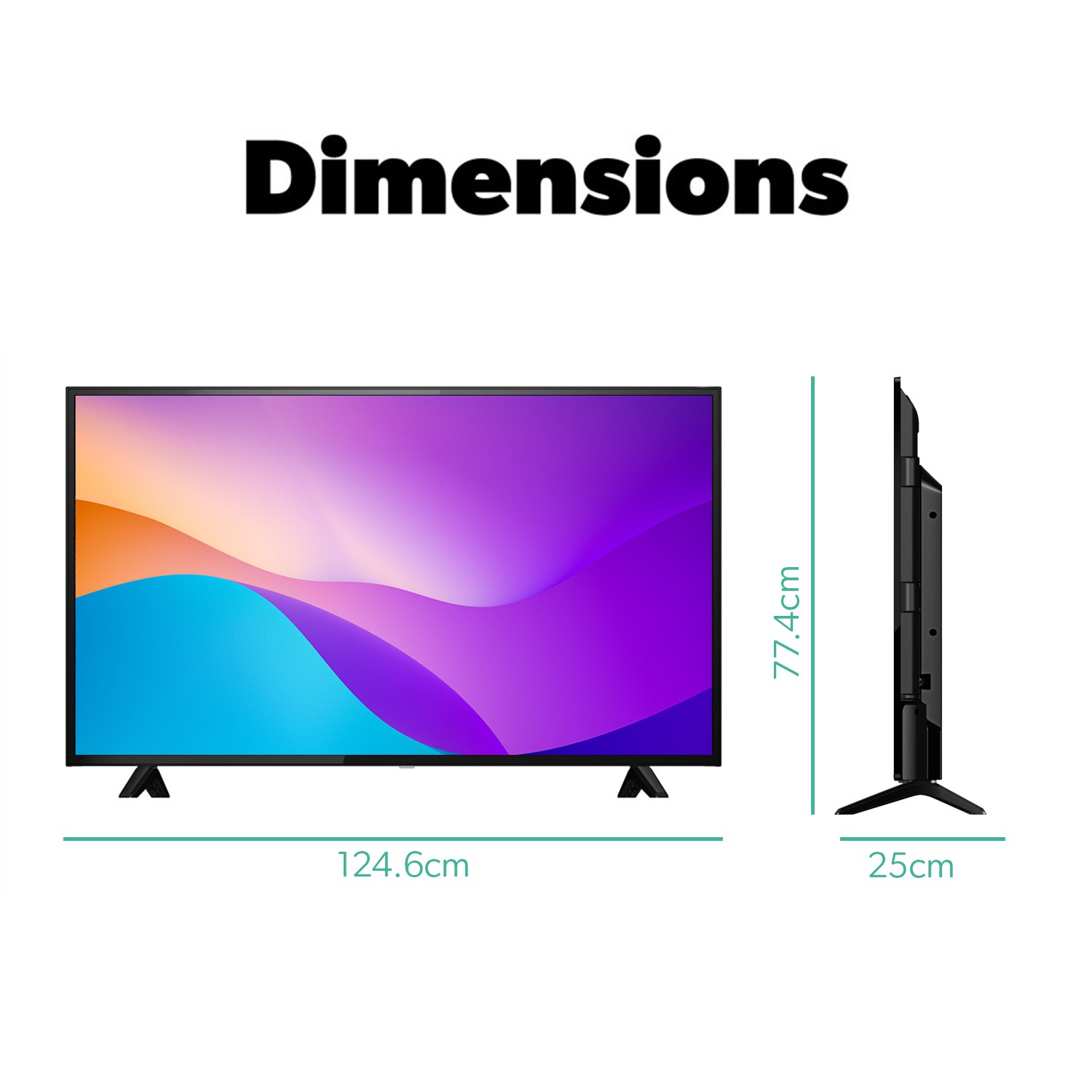
The size of a TV depends on several factors. The below TV Size Chart combines the TV sizes with Diagonal – Diameter in inches & centimeters. To complete it the height and width are added in cm and inches.
| TV Size in inch (Diagonal Size) | TV Diagonal in centimeter | TV Screen Size Width in cm | TV Screen Size Width in Inches | TV Screen Size Height in cm | TV Screen Size Height in inch |
| 15″ | 38,1 cm | 33,21 cm | 13.0″ | 18,68 cm | 7.35″ |
| 19″ | 42,26 cm | 40,06 cm | 15.75″ | 23,66 cm | 9.31″ |
| 22″ | 55,88 cm | 48,7 cm | 19.15″ | 27,4 cm | 10.78″ |
| 26″ | 66,04 cm | 57,56 cm | 22.66″ | 32,38 cm | 12.75″ |
| 32″ | 81,28 cm | 70,84 cm | 27.9″ | 39,85 cm | 15.7″ |
| 37″ | 93,98 cm | 81,91 cm | 32.25″ | 46,07 cm | 18.1″ |
| 40″ | 101,6 cm | 88,55 cm | 34.8″ | 49,81 cm | 19.6″ |
| 42″ | 106,68 cm | 92,98 cm | 36.6″ | 52,3 cm | 20.6″ |
| 47″ | 119,38 cm | 104,05 cm | 40.9″ | 58,53 cm | 23.0″ |
| 50″ | 127 cm | 110,69 cm | 43.5″ | 62,26 cm | 24.5″ |
| 55″ | 139,7 cm | 121,76 cm | 47.9″ | 68,49 cm | 26.9″ |
| 62″ | 157,48 cm | 137,26 cm | 54.0″ | 77,21 cm | 30.4″ |
| 70″ | 177,8 cm | 154,97 cm | 61.0″ | 87,17 cm | 34.3″ |
Related: What size is a 75 inch TV? Dimensions in cm, inches & room size, What size is a 55 inch TV? Dimensions in cm, inches & room size, What size is a 42 inch TV? Dimensions in cm, inches & room size

TV Sizes versus Distance from TV
The distance from the TV to the seat determines the size. As a guideline, you can take that 1 meter is equal to 39 inches. So are you 4 meters away from your TV? Then you need a size of at least 50 inches. Do you watch a lot? Then you can take a larger size.
| TV Size in inches | Distance from TV in Inches | Distance from TV in Meters |
| 32 inch (81 cm) | 8.2 feet | 2,5 meter |
| 40 inch (102 cm) | 9.0 feet | 3,1 meter |
| 46 inch (117 cm) | 11.5 feet | 3,5 meter |
| 55 inch (140 cm) | 13.8 feet | 4,2 meter |
related: How far should I sit from my TV? (Distance Calculator)
TV screen sizing explained (video)
Picture in a post by Rachel Claire via Pexels
Extended TV Size Chart: Large TVs from 75″ to 98″
As TV technology has advanced and prices have decreased, large-screen TVs have become increasingly popular. Here’s a comprehensive chart for larger TVs that are perfect for spacious living rooms, home theaters, and dedicated entertainment spaces.
| Diagonal Size | Diagonal (cm) | Width (cm/in) | Height (cm/in) | Min. 4K Distance |
| 75″ | 190.5 cm | 166 cm / 65.4″ | 93 cm / 36.6″ | 5.6 ft (1.7 m) |
| 77″ | 195.6 cm | 170 cm / 66.9″ | 96 cm / 37.8″ | 5.8 ft (1.8 m) |
| 80″ | 203.2 cm | 177 cm / 69.7″ | 100 cm / 39.4″ | 6.0 ft (1.8 m) |
| 83″ | 210.8 cm | 184 cm / 72.4″ | 103 cm / 40.6″ | 6.2 ft (1.9 m) |
| 85″ | 215.9 cm | 188 cm / 74.0″ | 106 cm / 41.7″ | 6.4 ft (1.9 m) |
| 86″ | 218.4 cm | 190 cm / 74.8″ | 107 cm / 42.1″ | 6.5 ft (2.0 m) |
| 88″ | 223.5 cm | 195 cm / 76.8″ | 110 cm / 43.3″ | 6.6 ft (2.0 m) |
| 90″ | 228.6 cm | 199 cm / 78.3″ | 112 cm / 44.1″ | 6.8 ft (2.1 m) |
| 98″ | 248.9 cm | 217 cm / 85.4″ | 122 cm / 48.0″ | 7.4 ft (2.2 m) |
💡 Large TV Considerations
When stepping up to a 75″ screen or larger, the logistics of the purchase are just as important as the picture quality. Here are the four critical factors to keep in mind:
⚖️ Weight & Mounting
- The Reality: TVs in the 75″+ range typically weigh between 80–150 lbs.
- The Action: You cannot use a standard mount. Ensure you have a heavy-duty, UL-rated wall mount and that you are securing it directly into wall studs. If using a stand, verify the weight capacity of your furniture.
🚪 Doorway & Logistics
- The Reality: The box is significantly larger than the TV itself. A 75″ TV box is roughly 70″ wide.
- The Action: Measure your doorways, hallways, and elevator depth before the delivery truck arrives. Getting a 98″ box around a tight corner can be nearly impossible.
🔍 Resolution Standards
- The Reality: At these massive scales, pixel density becomes visible.
- The Action: 4K is the absolute minimum requirement to avoid a “fuzzy” image. If you plan on sitting closer than the recommended average, 8K offers a noticeable jump in clarity for ultra-close, immersive viewing.
🏠 Room Scale
- The Reality: Large screens can easily overwhelm a small space, both visually and thermally.
- The Action: These sizes are best suited for rooms 300+ square feet where you can maintain a comfortable viewing distance of 8–15 feet.
TV Size by Room Type: Room-Specific Recommendations
Choosing the perfect TV size depends heavily on the room where it will be placed. Different rooms have different typical viewing distances, seating arrangements, and usage patterns. Here’s our comprehensive guide to selecting the ideal TV size for each room in your home.
Living Room TV Size Guide
The primary hub for movies, sports, and gatherings. It requires a screen large enough to be seen clearly from various seating angles.
- Recommended Sizes: 55″ to 75″
- Viewing Distance: 8–12 feet
- Sizing by Square Footage:
- Small (< 200 sq ft): 55″ – 65″
- Medium (200–300 sq ft): 65″ – 75″
- Large (300+ sq ft): 75″ – 85″
Pro Tip: Mount the TV so the center of the screen is at eye level when seated (usually 40–45 inches from the floor).
Bedrooms
Bedroom TVs are viewed from a reclined position, usually at a distance of 6–10 feet.
- Master Bedroom (43″ to 55″): Balance immersion with intimacy. Mount slightly higher (45–50 inches) to accommodate viewing from bed.
- Guest/Small Bedroom (32″ to 43″): Aim for a size that doesn’t dominate the room.
Kitchen & Home Office
Utility-focused spaces require compact, functional screens.
- Kitchen (24″ to 43″): Use 24″–32″ for countertops or 32″+ for breakfast nooks. Look for anti-glare coatings and voice control for hands-free operation.
- Home Office (32″ to 50″): Ideal for video conferencing and presentations. Ensure 4K resolution for crisp text and low input lag for smooth video calls.
Specialty Rooms
- Home Theater (75″ to 98″+): The goal is total immersion. For rooms deeper than 15 feet, consider a 4K/8K projector for a 100″+ cinematic experience.
- Gaming Room (55″ to 65″): Focus on specs over size. Look for 120Hz+ refresh rates, HDMI 2.1, and sub-20ms input lag.
- Basement/Rec Room (65″ to 85″): These spacious areas can handle larger screens and longer viewing distances (9–14 feet).
- RV/Camper (24″ to 32″): Prioritize lightweight, shock-resistant models with 12V DC compatibility.
Quick Reference Table
| Room Type | Recommended Size | Ideal Distance | Typical Room Size |
| Living Room | 55″ – 75″ | 8-12 ft | 200-400 sq ft |
| Master Bedroom | 43″ – 55″ | 6-8 ft | 150-250 sq ft |
| Guest Bedroom | 32″ – 43″ | 4-6 ft | 100-150 sq ft |
| Kitchen | 24″ – 43″ | 4-6 ft | 100-200 sq ft |
| Home Office | 32″ – 50″ | 4-7 ft | 100-200 sq ft |
| Home Theater | 75″ – 98″+ | 8-12 ft | 300+ sq ft |
| Gaming Room | 55″ – 65″ | 6-8 ft | 150-250 sq ft |
How to Choose the Right TV Size: Step-by-Step Guide
Selecting the perfect TV size doesn’t have to be complicated. Follow this simple process to make an informed decision that you’ll be happy with for years to come.
Step 1: Measure Your Viewing Distance
Using a tape measure, determine the distance from where the TV will be positioned to your main seating location (couch, chair, or bed).
- Example: If your couch is 9 feet (108 inches) from the wall, this is your viewing distance.
Step 2: Calculate Your Ideal Size Range
Use these formulas based on your desired resolution to find the “Sweet Spot”:
| Resolution | Formula | Example (at 108″) |
| 8K UHD | Distance ÷ 1.0 | 108″ Screen |
| 4K UHD | Distance ÷ 1.5 | 72″ Screen |
| 1080p HD | Distance ÷ 2.5 | 43″ Screen |
Step 3: Consider Room Dimensions
Before buying, ensure the physical unit fits your lifestyle:
- Wall Space: Ensure the TV width fits with 3–6 inches of clearance on each side.
- Eye Level: The center of the screen should be at eye level when seated.
- Furniture: Ensure your media console is at least as wide as the TV itself.
Step 4: Factor in Resolution & Quality
- 4K (3840 x 2160): The modern standard. Essential for any TV 50″ or larger.
- 8K (7680 x 4320): Premium option for 65″+ screens or those who sit very close.
- 1080p (1920 x 1080): Only recommended for budget TVs under 43″.
Step 5: Determine Your Budget Range
Here is the general market pricing for quality displays:
- 65″ (Value Sweet Spot): $500 – $1,500
- 75″: $900 – $2,500
- 85″+: $1,500 – $5,000+
Step 6: Verify Physical Compatibility
- VESA Pattern: Match your wall mount to the TV’s mounting holes.
- Weight: Confirm your wall studs or stand can support the weight (65″ TVs average 50–60 lbs).
- Cable Access: Leave 2–4 inches behind the TV for plugs and airflow.
Quick Decision Helper
If you are sitting:
- 6 feet away $\rightarrow$ 40″–50″ TV
- 7–8 feet away $\rightarrow$ 50″–60″ TV
- 9–10 feet away $\rightarrow$ 65″–75″ TV
- 11–12 feet away $\rightarrow$ 75″–85″ TV
- 13+ feet away $\rightarrow$ 85″+ TV or Projector
Common Sizing Mistakes to Avoid
- Going too small: “TV regret” is almost always about buying too small, rarely too large.
- Ignoring the Bezel: Remember to add an inch or two to the screen size for the actual frame width.
- Room Lighting: Bright rooms need LED/QLED for brightness; dark home theaters thrive with OLED for perfect blacks.
TV Size Comparison Guide: Side-by-Side Analysis
Struggling to decide between two sizes? This section breaks down the key differences between popular comparisons to help you make the right choice for your space and budget.
55″ vs 65″ TV: The Living Room Dilemma
This is the most common choice for modern homes. While 55″ was once the “big” standard, 65″ is rapidly becoming the new baseline for living rooms.
| Specification | 55″ TV | 65″ TV | Difference |
| Screen Width | 47.9″ (121.7 cm) | 56.7″ (144 cm) | 8.8″ wider |
| Screen Area | 1,293 sq in | 1,810 sq in | 40% more area |
| Viewing Distance | 4.6 – 6.9 ft | 5.4 – 8.1 ft | ~1 ft farther |
| Avg. Weight | 35–40 lbs | 50–60 lbs | 15–20 lbs heavier |
| Typical Price | $400 – $800 | $600 – $1,200 | $200–$400 more |
- Choose 55″ if: You sit under 8 feet away, have a room under 200 sq ft, or are furnishing a bedroom.
- Choose 65″ if: You want maximum immersion for movies/sports and your stand is at least 57″ wide.
65″ vs 75″ TV: Stepping Up to Large Screen
For those with larger open-concept rooms or dedicated media spaces.
| Specification | 65″ TV | 75″ TV | Difference |
| Screen Width | 56.7″ (144 cm) | 65.4″ (166 cm) | 8.7″ wider |
| Screen Area | 1,810 sq in | 2,407 sq in | 33% more area |
| Viewing Distance | 5.4 – 8.1 ft | 6.3 – 9.4 ft | ~1 ft farther |
| Avg. Weight | 50–60 lbs | 75–90 lbs | 25–30 lbs heavier |
- Choose 65″ if: You want to balance size and cost while keeping wall mounting relatively easy.
- Choose 75″ if: You sit 10+ feet away and want a truly cinematic “theater” feel at home.
75″ vs 85″ TV: The Premium Experience
At this level, the TV becomes the dominant feature of the room.
| Specification | 75″ TV | 85″ TV | Difference |
| Screen Width | 65.4″ (166 cm) | 74.1″ (188 cm) | 8.7″ wider |
| Screen Area | 2,407 sq in | 3,089 sq in | 28% more area |
| Weight | 75–90 lbs | 100–130 lbs | 25–40 lbs heavier |
| Installation | 2-person job | Pro-install recommended | High complexity |
Understanding “Screen Area”
Diagonal measurements are misleading. Because screens are measured from corner to corner, a small increase in inches leads to a massive jump in surface area:
- 55″ -> 65″: Adds 40% more screen (like adding a whole 32″ TV to the side).
- 65″ -> 75″: Adds 33% more screen (like adding a whole 40″ TV to the side).
- 75″ -> 85″: Adds 28% more screen (like adding a whole 50″ TV to the side).
Final Verdict: When to Size Up?
Size Up if: Your viewing distance is at the upper end of the range, or you primarily watch cinematic movies and sports. Size Down if: The TV would physically overwhelm the room or if you mostly watch news and standard talk shows where immersion isn’t the priority.
TV Mounting & Placement Guide
Proper TV placement is the difference between a cinematic experience and a literal pain in the neck. Whether you are wall-mounting or using a stand, these guidelines ensure your setup is both safe and comfortable.
The Golden Rule: Optimal Mounting Height
The most common mistake is mounting a TV too high. For the most comfortable experience, the center of the TV screen should be at eye level when seated.
- Standard Height: For most sofas, the center of the TV should be 40–45 inches from the floor.
- Pro Tip: Measure from the floor to your eyes while seated; that is your “target center.” If mounting in a bedroom for reclined viewing, add 5–10 inches to that height.
Center-of-Screen Targets by TV Size:
- 32″–43″: 38–42 inches from floor
- 50″–55″: 40–44 inches from floor
- 65″: 42–46 inches from floor
- 75″+: 44–50 inches from floor
The Fireplace Problem
Mounting above a mantel usually places the TV 50–55 inches high—far above eye level. This leads to neck strain and potential heat damage.
- The Fix: Use a pull-down (mantel) mount that lowers the TV for viewing, or a tilting mount to angle the screen down 10–15 degrees.
TV Stand Width Requirements
If you aren’t mounting, your furniture must be wider than the TV to prevent tipping and look proportional.
| TV Size | Actual TV Width | Min. Stand Width | Rec. Stand Width |
| 43″ | ~38″ | 40″ | 48″ – 54″ |
| 55″ | ~48″ | 50″ | 58″ – 65″ |
| 65″ | ~57″ | 59″ | 65″ – 72″ |
| 75″ | ~65″ | 67″ | 72″ – 80″ |
| 85″ | ~74″ | 76″ | 80″ – 90″ |
Wall Mounting Considerations
1. VESA Patterns & Weight
Check the back of your TV for the VESA pattern (distance between mounting holes in mm) and match it to your bracket.
- 65″ TVs: Typically 400x400mm; require an 80 lb load rating.
- 75″–85″ TVs: Typically 600x400mm+; require a 110–150 lb load rating.
2. Mount Types
- Fixed: Sits flush (minimalist). Best for eye-level viewing.
- Tilting: Tilts down. Best for TVs mounted higher up (like bedrooms).
- Full-Motion: Swivels and extends. Best for corners or wide rooms.
3. Wall Studs
Never mount a large TV into drywall alone.
- Up to 55″: Minimum 1 stud (2 preferred).
- 60″–75″: Minimum 2 studs with heavy-duty lag bolts.
- 80″+: Professional installation is highly recommended due to weight (100+ lbs).
Lighting & Glar
- Window Placement: Avoid placing a TV directly opposite a window. Side-lighting (perpendicular) is best.
- Eye Strain: Add bias lighting (LED strips) behind the TV. This reduces the contrast between the screen and the dark wall, making long movie sessions easier on your eyes.
TV Technology & Viewing Distance: How Display Tech Affects Sizing
Not all TVs are created equal. The technology under the hood affects how close you can sit, how the image looks from the side, and whether a large screen will overwhelm your room.
4K vs. 8K: Resolution & Distance
Resolution determines “pixel density.” Higher resolutions allow you to sit much closer without seeing the “screen door effect” (individual pixels).
| Resolution | Pixel Count | Formula | 65″ Optimal Distance |
| 1080p HD | 2.1 MP | Size × 2.5 | 10.8 ft (3.3 m) |
| 4K UHD | 8.3 MP | Size × 1.5 | 6.5 ft (2.0 m) |
| 8K UHD | 33.2 MP | Size × 1.0 | 4.3 ft (1.3 m) |
Key Insight: 4K allows you to go 40% larger than 1080p at the same viewing distance. While 8K doubles this benefit, it is primarily recommended for screens 75″ and larger where you sit under 6 feet away.
Panel Tech: OLED vs. LED vs. QLED
The type of panel you choose dictates your “Viewing Angle”—how far to the side someone can sit before the colors look washed out.
- OLED (Organic Light-Emitting Diode):
- Viewing Angle: Near-perfect (178°).
- Impact: Ideal for wide seating arrangements. You can go larger because the picture remains perfect even for guests sitting on the far end of the couch.
- QLED (Quantum Dot LED):
- Viewing Angle: Improved (165–175°).
- Impact: Best for bright, sunlit living rooms. High brightness allows for comfortable viewing even at standard distances in high-glare environments.
- LED/LCD:
- Viewing Angle: Limited (160–170°).
- Impact: Standard distance rules apply. Best for budget-conscious buyers in rooms where most seating is directly in front of the screen.
Refresh Rate & Usage (Gaming/Sports)
For fast-moving content, the refresh rate (measured in Hz) can influence your size choice.
- Competitive Gaming (144Hz+): Choose 43″–55″. Smaller screens are better for fast eye-tracking; you need the entire “battlefield” within your immediate field of vision.
- Immersive Gaming/Sports (120Hz): Choose 55″–65″. This is the sweet spot for RPGs, racing games, and football, allowing you to sit 10–15% closer for a “stadium” feel.
- Couch Co-op: Choose 65″–75″. Larger screens make split-screen gaming much more viable for multiple players.
2026 Trends: Future-Proofing Your Purchase
As we move through 2026, the “Standard” TV size continues to grow. What felt massive five years ago is now the baseline.
- Mini-LED: Now available in sizes up to 98″, offering OLED-like contrast for those who want a massive screen without the OLED price tag.
- QD-OLED: Combines perfect blacks with extreme brightness. If you’re buying a 77″ or 83″, this is the gold standard for 2026.
- The “Larger is Better” Rule: Content quality is improving so rapidly (more 4K/HDR streaming) that “TV regret” almost always comes from buying too small.
Recommendation: When torn between two sizes, always pick the larger one if your wall space and budget allow.
FAQ on TV screen sizes
What are standard TV screen sizes?
The common TV screen sizes available today are 32, 40, 42, 46/49 and 55 inch. The choice of the ideal screen size for the best viewing experience mainly depends on the distance between where the TV will be placed and your bed/couch/chair.
What is the most common TV size?
The average TV size in North American homes is currently 55 inches, but 65 inches is predicted to become more frequent as more people buy TVs.
How do I measure a TV screen size?
A TV’s size is defined by its diagonal length, which comes from measuring from the upper left-hand corner of the TV screen to the lower right-hand corner. Most TV screen sizes are expressed in inches.
How do you determine the right size TV for a room?
The evolution of TV screen technology allows you to sit closer to a 4K or 8K screen than older technology, like 1080p. The goal is to see the picture, not the pixels.
| TV size | Minimum distance for 4K TV | Minimum distance for 1080p TV |
| 40 inches | 40 inches (3.3 feet) | 80 inches (6.7 feet) |
|---|---|---|
| 42 inches | 42 inches (3.5 feet) | 84 inches (7 feet) |
| 48 inches | 48 inches (4 feet) | 96 inches (8 feet) |
| 50 inches | 50 inches (4.2 feet) | 100 inches (8.3 feet) |
| 55 inches | 55 inches (4.6 feet) | 110 inches (9.2 feet) |
| 60 inches | 60 inches (5 feet) | 120 inches (10 feet) |
| 65 inches | 65 inches (5.4 feet) | 130 inches (10.8 feet) |
| 75 inches | 75 inches (6.25 feet) | 150 inches (12.5 feet) |
| 85 inches | 85 inches (7.1 feet) | 170 inches (14.2 feet) |
Size-charts tip: the viewing distances for 8K TVs will be similar to the guidelines for 4K TVs.
What are the most popular TV-screen dimensions?
42, 50, 55, 65, and 75 inches are the most popular TV dimensions (all measured diagonally). You might discover various models between those sizes, but variations are uncommon, especially at the larger end of the spectrum.
What Do Various Tv Screen Sizes Mean?
The diagonal measurement of a TV screen corresponds to the advertised screen size. To put it another way, a line’s length would extend from one corner of the screen to the other. The actual TV Dimensions like width and depth, which differ from the screen size stated, are typically mentioned in the product specifications.
Is a 55 inch TV big enough for a living room?
A 55 inch TV is generally big enough for most living rooms, particularly those with seating 7-9 feet from the screen. For 4K TVs (which is standard in 2025), a 55″ TV is comfortable when viewed from 5.5 to 8 feet away. However, if your living room is larger than 250 square feet or you sit more than 9 feet away, consider upgrading to a 65″ or even 75″ model for a more immersive experience. The trend toward larger TVs means many people find 65″ to be the new “standard” living room size.
How far should you sit from a 65-inch TV?
For a 4K resolution 65-inch TV, the optimal distance is between 5.4 and 8.1 feet.
- The Sweet Spot: 8 feet is ideal for most viewers.
- 1080p Exception: If you have an older 1080p set, you should sit farther back—approximately 10.8 feet—to avoid seeing pixel grain.
Should I get a 65 or 75-inch TV?
- Choose 65″ if: You sit 8–10 feet away, your room is under 300 sq ft, or you want to save $400–$800.
- Choose 75″ if: You sit 10–12 feet away or have a room larger than 300 sq ft.
Note: A 75″ screen provides 33% more viewing area than a 65″, making it a massive upgrade for sports and movies.
What size TV for a 12×12 room?
For a 144 sq ft room, a 50 to 55-inch TV is typically the perfect fit.
- At this room size, seating is usually 7–9 feet from the wall.
- If you want a “home theater” feel, you can push to 65 inches, provided your furniture layout allows for it.
Can a TV be too big for a room?
Yes, but it is rare with 4K technology. A TV is only “too big” if:
- You can see individual pixels (sitting too close).
- You have to physically move your head to see the whole screen.
- It overwhelms the room’s decor or causes eye strain.Most buyers eventually regret buying too small, not too large.
What size TV for an 8-foot viewing distance?
At 8 feet (96 inches), the ideal range is 55 to 65 inches.
- The Math: $96 \div 1.5 = 64$.
- A 65″ TV is almost exactly the mathematical ideal for 4K immersion at this distance.
Is an 85-inch TV too big for a living room?
Not if your room is 400+ sq ft and you sit 10–12 feet away.
- Requirements: You’ll need a wall at least 75 inches wide and a heavy-duty mount capable of supporting 100–130 lbs.
Do TV dimensions include the stand?
No. Advertised sizes (e.g., “65-inch”) are diagonal measurements of the screen only.
- Width/Height: Usually include the bezel (frame).
- Depth: Does not include the stand unless specified.
- Tip: Always check the “Dimensions with Stand” spec to ensure it fits on your furniture.
What is a VESA mount pattern?
It is the standard measurement (in millimeters) of the four mounting holes on the back of the TV.
- Common Patterns: 200x200mm (small), 400x400mm (medium/large), 600x400mm (extra-large).
- Action: You must match your wall mount’s VESA rating to your TV’s specific pattern.
How high should a TV be mounted?
The center of the screen should be at eye level, typically 40–45 inches from the floor.
- Bedroom Rule: If you are watching while reclined in bed, mount the TV 5–10 inches higher than your seated eye level.
What’s the difference between 4K and 8K viewing distance
8K allows you to sit 33% closer than 4K without seeing pixels.
- 65″ 4K Ideal: 5.4 feet
- 65″ 8K Ideal: 4.3 feet
- Verdict: Unless you are buying a massive 75″+ screen, 4K is currently the better value for most homes.
What’s the most popular TV size in 2026?
The 55-inch and 65-inch models remain the industry leaders, accounting for roughly 60% of all sales. However, 75-inch and 85-inch models are seeing the fastest growth as prices continue to drop.
Other Screen Sizing Charts
- TV Size Chart – All TV sizes & TV dimensions

- Apple iPad Size Chart
- 75-inch TV Dimensions. Dimensions in CM, Inches & Room Size
- Apple iPhone Size Chart
- Apple Vision Pro Size and Dimensions : how big is it?
- Samsung Galaxy Size Chart : Samsung phone dimensions
- What Size is a 42 Inch TV? 42 TV Dimensions in CM & Inches
- Amazon Kindle Size by Model : What Size are Kindles?
- What size is a 55 inch TV? Dimensions in CM, Inches & Room Size
- Computer Monitor Size Chart: Which Size is the Best?
- Apple Watch 8 Size Guide vs Other Apple Watch Series
- iPhone 13 Pro Max Screen Size Chart vs Other iPhone Dimensions
- iPhone 13 Screen Size Chart: Dimensions vs Other iPhone Models










TV Appearance and models
There are many types of TVs these days. The curved models are relatively new. These models are characterized by the screen running in a curve. The advantage of this is that the image is displayed around you, as it were. The model is most suitable for use on a stand and less for hanging on the wall because the corners protrude in relation to the curve.
The TV Size Chart summarizes the most popular TV sizes in centimeters and inches to help people determine the right TV Size.

There is a typo in the “TV Size versus Distance from TV” section: 1 meter is equal to about 39 inches, not 13.
Hello Sara,
thanks for pointing it out! We have corrected the typo in the meantime. Really thankful. All the Best. Pablo